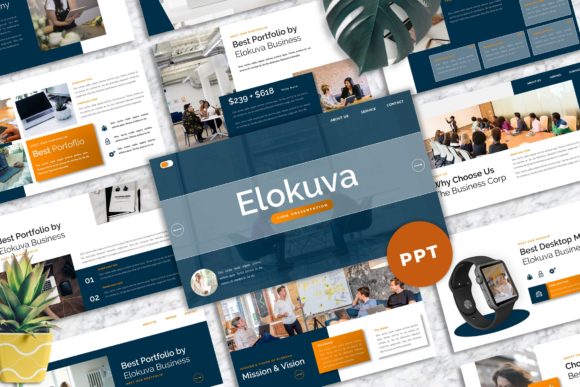
Elokuva: A Flexible Template for Professional Presentations
The Anatomy of a Modern Design System
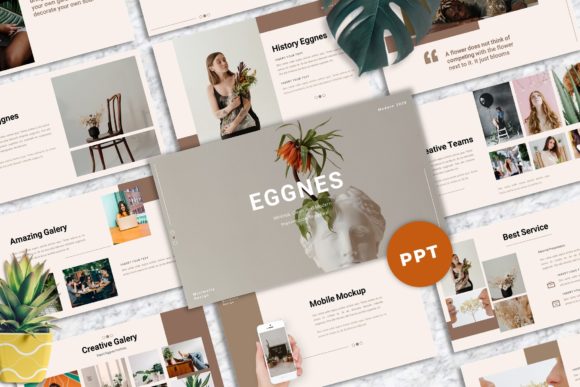
When you are preparing a high-stakes pitch, a portfolio review, or a quarterly update, the tools you use define your confidence. Elokuva - Firm Powerpoint Templates is not just a set of slides; it is a structured design environment built for serious communication. The visual personality of this template leans heavily into modern typography and corporate clarity. It strikes a balance between the rigid structure required for corporate data and the aesthetic flair needed for creative studio work.
The immediate appeal lies in its "firm" aesthetic. We are talking about a clean, uncluttered interface where content breathes. The style is distinctly professional, utilizing a 16:9 Wide Screen Ratio that fills modern monitors and projectors perfectly. Unlike cluttered templates that try to do too much, Elokuva focuses on hierarchy. It uses vector based icons and strong grid systems to guide the viewer's eye. This makes it an ideal design asset for anyone who needs to project authority without sacrificing visual appeal. Whether you are a designer presenting a brand identity concept or a marketer outlining a strategy, the visual foundation here is solid.
Practicality Meets Polish: Features That Save Time
The true value of a premium font or template is measured in how much time it saves you during the production phase. Elokuva excels here with 40 Master Slide Layouts. For the uninitiated, the "Master Slide" is the backbone of PowerPoint design. By basing the design on master slides, Elokuva ensures that if you change a color or font in one place, it updates consistently across the deck. This is vital for maintaining consistency and professionalism.
One of the standout features is the Picture Placeholder system combined with Drag and Drop capability. In a real-world workflow, you often have to swap out stock photos or client images at the last minute. Instead of fighting with cropping tools, you simply drag your image into the designated area, and the template handles the framing. This "Easy to use" functionality is critical for entrepreneurs and small business owners who are designing their own decks.
Furthermore, the template includes Unique mockup devices. If you are a web designer or app developer, showing your work inside a realistic laptop or phone frame adds a layer of context that flat screenshots cannot achieve. The fact that all graphics are resizable and editable means you aren't locked into a rigid structure. You can expand a section for a photography portfolio or condense it for a dense financial report.
Strategic Application: Where Elokuva Fits Best
Understanding where to deploy Elokuva - Firm Powerpoint Templates is key to getting a return on your investment. This is a versatile tool, but it shines brightest in specific contexts.
- Agency and Corporate Pitches: The "Firm" in the title is there for a reason. The layout supports complex data visualization and text-heavy slides without looking messy. It builds trust with stakeholders who expect a polished brand identity.
- Portfolio Presentations: For photographers, crafters, or graphic designers, the image placeholders allow your work to take center stage. The neutral background ensures your portfolio items pop.
- Educational and Workshop Content: Bloggers and content creators can use this for webinars. The strong focus on typography ensures that key takeaways are readable, even on smaller screens.
Refining Your Message: Fonts and Usability
A common pitfall in presentation design is poor readability. Elokuva addresses this by recommending free web fonts that are included in the documentation. This is a subtle but crucial detail. Using system-standard or widely available web fonts ensures that your presentation looks the same on your laptop as it does on your client's machine.
When working with this template, consider your font pairing. While the template provides a solid default, you might want to align it with your company's specific serif font or sans serif font guidelines. Because the template is easily editable, you can swap the typeface to match a specific editorial design mood. However, pay attention to the visual hierarchy already established. The headings are sized to command attention, while body text is optimized for legibility during a presentation flow.
Finalizing Your Workflow
The package comes as a .PPTX file, which is the native PowerPoint format, ensuring maximum compatibility across Windows and Mac environments. While the demo images from Unsplash and Pexels are not included (standard for commercial font and template licensing), the placeholder system makes inserting your own images straightforward.
For the hobbyist or personal portfolio user, this template offers a way to look "established" without hiring a design agency. For the professional, it is a robust design asset that streamlines the creation of high-impact presentations. By utilizing the drag and drop features and respecting the master slide architecture, you ensure that your final output is not just visually appealing, but structurally sound and professional.