Smugle: Modern Musician Googleslide Templates for Creatives
Beyond the Music: A Visual System for Musicians and Creators
When you're a musician, your sound is everything. But in today's digital landscape, your visual presentation is what makes the first impression. You need a toolkit that speaks the same language as your music—professional, clean, and distinctly creative. That's precisely what Smugle - Musician Googleslide Templates delivers. This isn't just a collection of slides; it's a comprehensive design system built on Google Slides, offering a powerful way to showcase your work, pitch to venues, or present a portfolio without needing a background in graphic design.
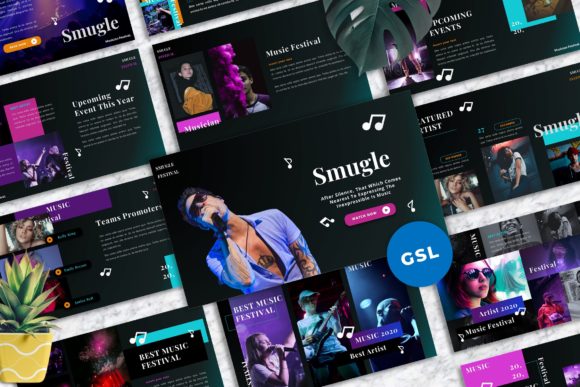
At its core, Smugle is a premium presentation template featuring 40 master slide layouts. The visual personality is one of modern sophistication. It leans into clean lines, strong typographic hierarchy, and ample white space, creating a sense of clarity and focus. The style avoids clutter, directing the viewer's eye exactly where you want it—on your music, your story, and your brand. This makes it an excellent choice for anyone in the creative industry, from a solo artist crafting an EPK (Electronic Press Kit) to a small creative agency presenting a client project. The overall appeal lies in its balance of professionalism and artistic flair, ensuring you look presentable and credible to any audience.
Practical Applications: From EPKs to Business Pitches
The true value of a template like Smugle - Musician Googleslide Templates is in its real-world utility. For a musician, this is your digital stage. Use the portfolio layouts to display high-resolution photos from live shows or studio sessions. The mockup device slides are perfect for showing your music streaming on a phone or tablet screen, adding a tangible, professional touch to your digital presence. Need to pitch a new song to a playlist curator or a festival booker? The clean, structured layouts help you build a compelling narrative, guiding the viewer through your bio, press clippings, tour dates, and music samples in a logical, engaging flow.
Beyond music, this template's versatility shines. Entrepreneurs and small business owners can adapt it for investor pitches or company overviews. Marketers and bloggers will find the drag-and-drop image placeholders invaluable for creating visual content plans or campaign presentations. The design itself influences audience engagement; a well-structured presentation with a clear visual hierarchy keeps viewers focused and makes your key points memorable. The consistency provided by using the same master slides throughout reinforces your brand identity, whether you're presenting to industry insiders or your own fan community.
Design Intelligence: Features That Save Time and Elevate Quality
What sets Smugle apart from a basic slide deck is its thoughtful design intelligence. The template is built on master slides, which is the professional standard. This means you can make a change to a font or color scheme in one central place, and it will update across all 40 layouts. This is crucial for maintaining brand consistency, especially if you're working with a team or updating your materials over time. The easy color change feature allows you to align the entire presentation with your personal or project branding in minutes, not hours.
The attention to detail is evident in the assets included. All graphics are vector-based and fully resizable, so they stay crisp on any screen. The use of recommended free web fonts means you won't run into compatibility issues or unexpected costs. The 16:9 widescreen ratio is optimized for modern displays and projectors, ensuring your presentation looks its best everywhere. For those who aren't design experts, the picture placeholder system is a game-changer. You simply drag and drop your images into designated areas, and the template automatically crops and scales them to fit the layout perfectly. This removes the guesswork and technical hassle, letting you focus on your content.
Getting Started and Making It Your Own
Adopting a new design asset should be straightforward. Upon purchase, you receive the Google Slides file and a documentation file. The documentation is key—it lists the free fonts used and provides guidance. To begin, make a copy of the template to your Google Drive. Start by exploring the master slide view to familiarize yourself with the structure. Before adding your content, take a moment to set your brand colors using the easy color change instructions. This simple step will instantly personalize the entire deck.
When building your presentation, think like a designer. Use the layouts as intended; a title slide is for titles, a content slide is for detailed information. This maintains the professional visual hierarchy the template provides. Test your font pairings if you choose to deviate from the recommendations, but the included fonts are selected for their strong readability and modern typography feel. Remember, the goal is clear communication. The Smugle - Musician Googleslide Templates provide the structure and style, but your authentic content—your music, your story, your vision—is what will ultimately connect with your audience and make your presentation stand out.