Why Cope Minimal PowerPoint Templates Are a Game-Changer
In a world saturated with visual noise, the power of a clean, focused presentation cannot be overstated. Whether you're pitching to investors, sharing a portfolio, or outlining a new strategy, your slides need to support your message, not compete with it. This is the core principle behind Cope - Minimal Powerpoint Templates. It’s not just another set of slides; it's a carefully constructed framework designed to bring clarity and professionalism to your ideas.
A Foundation of Clarity and Professionalism
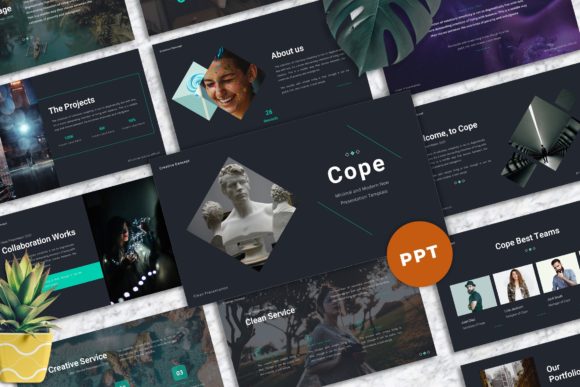
The visual personality of the Cope template system is one of sophisticated restraint. It champions modern typography and ample white space, creating a sense of calm authority. Each of the 40 master slide layouts is built with a strong focus on usability, meaning you spend less time wrestling with formatting and more time refining your content. The design avoids trendy flourishes that quickly date, opting instead for a timeless aesthetic. This makes it an excellent design asset for a wide range of users—from a creative studio presenting a new campaign to a small business owner outlining their annual goals. The overall appeal is one of quiet confidence; your work and your data take center stage.
Practicality is woven into every detail. The 16:9 widescreen ratio is the standard for modern displays and projectors, ensuring your presentation looks sharp everywhere. Features like drag and drop image placeholders and easy color change capabilities are not just conveniences; they are essential tools for efficiency. For a marketer needing to quickly adapt a presentation for different client brand guidelines, or a blogger creating a visual guide for their audience, these features are invaluable. The inclusion of unique mockup devices is a particularly thoughtful touch, allowing you to showcase websites, apps, or social media graphics within a realistic context without leaving PowerPoint.
Strategic Applications Across Industries
The true strength of a tool like Cope - Minimal Powerpoint Templates lies in its versatility. It functions much like a premium font—a foundational element that elevates the entire project. Consider its application in brand identity work. When presenting a new logo or visual system to a client, the clean canvas of Cope ensures the logo design itself is the hero. The template’s disciplined use of visual hierarchy guides the viewer’s eye exactly where you want it, reinforcing your strategic rationale.
- For Agencies and Freelancers: Use it for client pitches, project proposals, and case study presentations. The professional tone builds immediate credibility.
- For Educators and Publishers: Create engaging lectures, workshop materials, or book proposals. The focus on readability makes complex information more digestible.
- For Corporate and Startups: Ideal for internal strategy meetings, board reports, and investor decks. It conveys seriousness and preparedness.
- For Personal Use: Perfect for crafting a standout personal portfolio or a compelling visual story for a hobbyist project.
Imagine a photographer using this template. The slide layouts become a gallery wall, allowing each image to breathe without distracting borders or backgrounds. A content creator outlining a video series can use the structured layouts to map out scripts and storyboards clearly. The template doesn't impose a style; it provides a neutral, sophisticated stage.
Maximizing Impact with Thoughtful Execution
Simply downloading a great template is only the first step. To leverage Cope - Minimal Powerpoint Templates effectively, you need to treat it as a collaborator. Start by reviewing all 40 layouts to understand the available structures for different types of content—data slides, image-heavy slides, text-centric slides. This prevents you from forcing content into ill-fitting formats.
Font pairing is critical, even within a template that recommends free web fonts. The documentation file, which includes font information, is your guide. Test how your chosen sans serif font for body text interacts with a potential display font for headlines. Ensure the combination maintains the template’s core principle of clarity. While the template is easily editable, resist the urge to over-customize. Subtle color changes to align with a brand are wise; adding excessive gradients or shadows will undermine the minimal aesthetic that makes it work.
Always remember that the included images are for preview only. Your own high-quality visuals are what will make the presentation uniquely yours. Use the picture placeholder feature to drop in your photographs, illustrations, or product shots. This is where your story comes to life. For those in commercial fields, rest assured the template is designed for professional use, allowing you to create presentations for clients with confidence.
Ultimately, Cope - Minimal Powerpoint Templates is more than a collection of slides. It’s a strategic tool for clear communication. By providing a clean, well-organized, and highly functional foundation, it empowers designers, entrepreneurs, and creators to present their ideas with the focus and professionalism they deserve. It’s an investment in your ability to be understood, which is the first step toward being persuasive.