Streamline Your Creative Workflow with Back to School Canva Editable Templates
As the seasons change and the familiar rhythm of a new academic year approaches, the demand for functional, aesthetically pleasing stationery skyrockets. For designers, entrepreneurs, and content creators, this presents a unique opportunity to offer products that are not only useful but also beautifully crafted. If you have ever wanted to create your own line of school notebooks without the steep learning curve of complex design software, the Back to School Canva Editable Templates offer a direct path from concept to finished product. This collection is built specifically for those who value efficiency, customization, and a clean, professional finish.
A Practical Foundation for Physical Products
At the heart of this offering is a set of meticulously designed interior pages. These are not just rough sketches; they are production-ready files tailored for the popular 6x9 inch format. This size is a sweet spot for notebooks—large enough for comfortable writing yet compact enough to slip into a backpack or tote. Each interior file contains 100 pages, a standard count that balances bulk and usability for the end user.
What makes these interiors particularly valuable for a brand strategist or publisher is the level of control they afford. Every single line within the templates is editable. This means you can adjust the weight, color, or spacing of the grid lines to match a specific brand identity or visual theme. Unlike static PDFs, these files allow you to manipulate the very structure of the page, ensuring that the final product feels cohesive with your cover design.
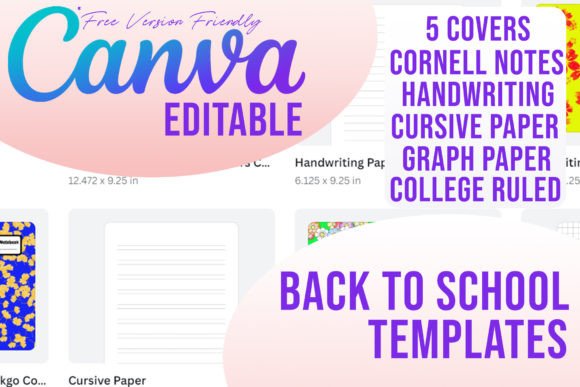
The collection includes five distinct styles, covering the most sought-after formats in academic and personal stationery:
- Cornell Notes: A staple for students and professionals, this layout divides the page into cues, notes, and summary sections. It is ideal for educational markets and productivity-focused brands.
- Handwriting Paper: Featuring a structured space for writing and a dedicated area for illustrations, this is perfect for primary education materials or creative sketching.
- Cursive Paper: Designed with specific guidelines to aid in learning cursive script, this layout serves a niche but dedicated audience of educators and parents.
- Graph Paper (4x4): The standard grid is essential for math, science, bullet journaling, and technical sketching. It appeals to a wide demographic, from students to engineers.
- College Ruled Paper: The classic choice for general writing, note-taking, and journaling. It is the universal language of notebooks.
Designing the Complete Package
A notebook is defined by its cover just as much as its interior. Recognizing this, the package includes covers that supplement the interiors provided. These designs are crafted to work harmoniously with the internal pages, offering a ready-made aesthetic that you can deploy immediately. However, the true power lies in the invitation to customize. You may use the covers as they are for a quick launch, or, preferably, customize them to your taste.
For the graphic designer or marketer, this is where the creative process becomes engaging. You can treat these covers as a blank canvas to apply your unique typography choices. Whether you prefer a bold sans serif font for a modern, clean look, or a sophisticated serif font for a classic academic feel, the templates provide a solid starting point. You might overlay a script font for a personalized touch or a handwritten font to evoke a sense of warmth and creativity.
Crucially, this collection was built with accessibility in mind. No premium elements are used, so free users can use the templates without any problems. This is a significant advantage for small business owners or hobbyists who are just starting out and may not have access to paid Canva subscriptions or expensive design assets. You can create a high-quality logo design for your notebook line or experiment with packaging design concepts without hitting a paywall.
Real-World Applications and Market Potential
The versatility of these templates extends far beyond the classroom. For entrepreneurs looking to enter the print-on-demand market, these interiors are a goldmine. The Cornell Notes layout, for example, can be marketed to college students, law professionals, and medical students. By pairing it with a cover design that speaks to "Legal Studies" or "Medical School Essentials," you create a targeted product with high perceived value.
Similarly, the Graph Paper interior is a favorite among the bullet journaling community. By customizing the cover with trendy modern typography and minimalist design, you can tap into the planner market. The ability to edit every line means you could even create a hybrid layout—perhaps adding a dot grid overlay to the graph paper for a more flexible planning experience.
For content creators and bloggers, these templates offer a way to create branded merchandise or lead magnets. Imagine offering a free, downloadable "Content Planning Notebook" to your email subscribers. Using these templates, you can quickly assemble a Cursive Paper or College Ruled interior, brand the cover with your website’s colors and font pairing, and provide a tangible tool that reinforces your brand identity.
Ensuring Professional Quality and Readability
When developing a physical product like a notebook, readability and usability are paramount. The Back to School Canva Editable Templates have been structured to ensure that the final printed product is functional. The margins are appropriate for binding, and the line spacing is calibrated for comfortable writing.
As you customize, keep a few practical design principles in mind. If you are altering the line colors, ensure there is enough contrast against white paper so the guidelines are visible but not distracting. A light grey or soft blue often works best for graph paper or college ruled lines, as it guides the eye without overpowering the ink from the user's pen.
When selecting a typeface for your cover, consider the visual hierarchy. The title of the notebook should be the focal point. Use a display font for the main title to grab attention, but switch to a clean, legible sans serif font for any subtitles or descriptive text. This balance ensures the cover looks professional and communicates its purpose instantly.
Ultimately, these templates are more than just files; they are a toolkit for creative professionals. They bridge the gap between a high-level idea and a tangible, market-ready product. Whether you are creating a line of journals for an e-commerce store, designing resources for a classroom, or simply organizing your own notes, the ability to edit every detail ensures that the final result is uniquely yours. The combination of practical interiors and customizable covers provides a streamlined workflow that respects your time while empowering your creative vision.