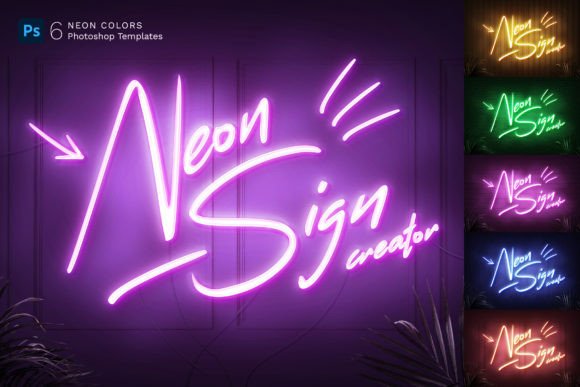
Neon Sign Templates: Create Custom Glow Effects for Any Project
There's an undeniable energy to a neon sign. It's not just light; it's atmosphere, nostalgia, and a bold statement all at once. For designers, marketers, and creators, capturing that authentic, electric glow in a digital project used to be a complex task. It required advanced skills in lighting effects, reflections, and texture work. That's precisely where a well-built set of Neon Sign Templates changes the game, offering a powerful shortcut to professional, realistic results without the steep learning curve.
Beyond the Logo: A Universe of Neon Possibilities
Most people think of neon signs as glowing text or a company logo. While these Neon Sign Templates excel at that, their true value lies in their versatility. You're not limited to simple letterforms. This toolkit allows you to transform virtually any vector shape, linear icon, or outlined graphic into a convincing neon fixture. Imagine turning a custom illustration for a coffee shop into a glowing wall piece for its website, or creating an iconic symbol for a YouTube channel that literally lights up the screen. The template's smart object system handles the complex work of simulating the glass tube, the subtle inner glow, and the realistic light falloff on the surrounding wall.
The realism is taken a step further with thoughtful environmental details. Each PSD file comes with a selection of five distinct background wall textures, giving you concrete, brick, and other urban surfaces to ground your design. Layered in front are natural palm leaves, adding a touch of organic, life-like depth that prevents the graphic from feeling flat or purely digital. This combination of a premium font style effect and textured scenery creates a complete scene, not just a floating graphic. The included wires and mounting hardware are subtle but crucial details that sell the authenticity of the final image.
Practical Applications for Real-World Design Work
The utility of these assets extends far beyond a single project. A social media manager can use them to create a consistent series of eye-catching social media graphics for Instagram stories or Facebook banners, where the vibrant glow naturally stops the scroll. For a blogger or publisher, a neon-style header image can instantly set a retro, energetic, or nightlife tone for an article. In editorial design, these effects work beautifully for magazine features on music, entertainment, or urban culture, adding a dynamic visual element to layouts.
Entrepreneurs and small business owners will find particular value here. Creating a unique brand identity element, like a neon sign version of a tagline for use on menus, posters, or advertisement graphics, becomes a straightforward process. It's a fantastic way to develop a recognizable visual hook for a bar, restaurant, event promotion, or even a boutique retail brand. The templates are equally at home in packaging design for products that want to convey a fun, modern, or edgy personality. Because the final output is high-resolution (3000x2000 pixels at 300 DPI), it's perfectly suited for print applications like flyers, posters, and even movie title sequences, ensuring the glow looks crisp and professional in any medium.
Getting the Most from Your Neon Toolkit
Using the templates is designed to be intuitive, but a few practical tips can enhance your workflow. The core of the system is the Smart Object Replacement feature in Photoshop. You simply double-click the smart layer, paste your vector shape or text, save, and the entire neon effect and background composite updates automatically. This non-destructive method means you can experiment endlessly with different designs without starting from scratch.
While the template provides a convincing display font effect, consider your overall composition. The neon style is inherently bold and high-contrast, making it ideal for headlines, logos, and focal points. For body text or smaller informational elements, pairing it with a clean, readable sans serif font or even a simple serif font creates a balanced font pairing that guides the viewer's eye effectively. The six included color options give you a solid palette to start with, but don't hesitate to adjust the hue and saturation within Photoshop to match a specific brand color or desired mood.
Think of these Neon Sign Templates as a foundational design asset. They provide the complex lighting and texture work, freeing you to focus on the creative application. Whether you're crafting a logo design concept, building out a web design hero section, or producing promo ads, this resource offers a professional, time-saving solution to add a memorable and vibrant visual element to your work. The included video instruction and PDF help file ensure you can start creating immediately, even if you're not yet a Photoshop expert. It’s a practical toolkit built for real creative work, turning a complex visual effect into a repeatable, reliable process.