How to Make Pinterest Pins That Actually Convert
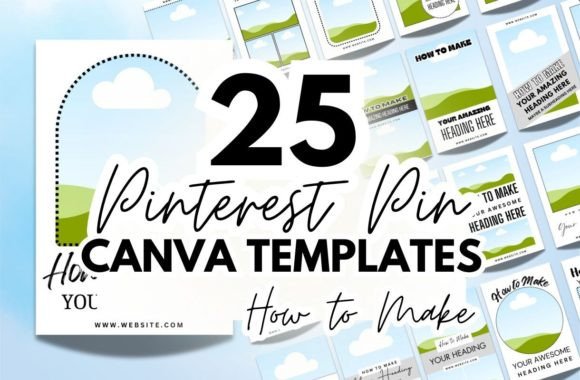
If you’ve spent any time scrolling through Pinterest, you know the scroll-stopping power of a well-designed pin. It’s not just about a pretty picture; it’s about clarity, promise, and a clear value proposition. For anyone creating tutorials, recipes, or DIY guides, the challenge is consistent: how do you communicate a process visually in a single, compelling graphic? The answer often lies in a structured yet flexible design system. This is where our "How to Make" Pinterest Canva Templates come into play, offering a direct solution for creators who need professional results without the design overhead.
The Anatomy of an Effective "How To" Pin
A successful "how-to" pin on Pinterest functions as a visual promise. It needs to immediately signal that valuable, step-by-step content follows. Our templates are built around this core principle. The prominent "How To Make" heading is more than just text; it's a psychological trigger that tells the viewer exactly what kind of content they're about to engage with. The visual style leans towards clarity and approachability, using clean layouts that prioritize the instructional message. This isn't about flashy, trend-driven graphics; it's about establishing a reliable visual language that your audience comes to recognize and trust, which is fundamental to building a strong brand identity.
The versatility of this collection is a key strength. You’ll find templates with a modern, minimalist sans serif font for tech tutorials, others with a warm, handwritten script font for crafting projects, and some using a classic serif font for recipe blogs. This variety isn't random. It’s designed to let you match the template's personality to your content's mood and your brand's aesthetic. A food blogger might choose a template with ample space for a hero image and a clean serif typeface, while a DIY woodworker might opt for a bolder display font and a layout that highlights finished project shots. The goal is to provide a starting point that feels intentional, not generic.
Practical Applications Across Your Content Ecosystem
While these are Pinterest Pin Templates, their utility extends far beyond a single platform. Think of them as foundational design assets for your entire content strategy. A pin template for "How to Make Sourdough Starter" can be adapted into a YouTube thumbnail, an Instagram carousel slide, or a featured image for your blog post. This approach ensures visual consistency across platforms, which strengthens brand recognition. When your Pinterest graphics, Instagram stories, and blog headers share a common design language, you present a cohesive and professional front to your audience, which builds credibility.
For entrepreneurs and small business owners, this consistency is crucial. It allows you to create a library of branded content quickly. The templates in Canva are fully customizable, meaning you can set your brand colors and fonts once and apply them across all 25 designs. This transforms the templates from one-off designs into a sustainable system for producing on-brand social media graphics. Whether you're announcing a new product tutorial, sharing a customer success story in a step-by-step format, or promoting a workshop, you have a reliable starting point that aligns with your existing brand identity.
Choosing and Customizing for Maximum Impact
Selecting the right template from the collection involves a simple evaluation. Consider the primary visual element of your content. If it's a process shot, choose a layout with a large image placeholder. If your strength is in clear, textual instructions, a template with well-structured text boxes might be better. Pay attention to the included font pairings. A strong visual hierarchy—where the "How To Make" headline is clearly dominant, followed by a subheading or key benefit—is what makes a pin scannable. Test different templates with your actual content; what looks good in the abstract must work with your specific images and copy.
Customization is where you make the template your own. Start by uploading your brand's color palette and fonts into Canva. Then, replace the placeholder text with your clear, concise headline. Don't just write "How to Make Bread"; try "How to Make No-Knead Bread in 3 Hours." The more specific and benefit-driven your text, the higher the engagement. Use high-quality, vertical images that are well-lit and tell the story of your process. The design should support the image, not compete with it. Finally, remember that readability on mobile is paramount. Ensure your text is large enough to be legible on a small screen and that there is sufficient contrast between text and background colors.
Beyond the Design: Strategy for the Pinterest Feed
A beautiful template is a tool, but strategy is what drives results. Consistency in posting is just as important as consistency in design. Use these templates to create a content calendar, batching your pin creation to maintain a steady presence. Analyze which template styles and topics resonate most with your audience through Pinterest Analytics. Do pins with a certain color scheme or layout get more saves? That’s direct feedback to guide your future design choices. The templates give you efficiency, allowing you to focus more on the strategic layer of content planning and audience engagement.
Ultimately, these "How to Make" Pinterest Canva Templates are about removing friction from the creative process. They provide a professional, adaptable foundation so you can spend less time wrestling with design software and more time creating the valuable how-to content your audience is searching for. By leveraging a structured approach to your visual content, you enhance clarity, build brand equity, and create a more engaging experience for your followers, pin by pin.