20 Notion Templates Bundle: Your All-in-One Productivity System
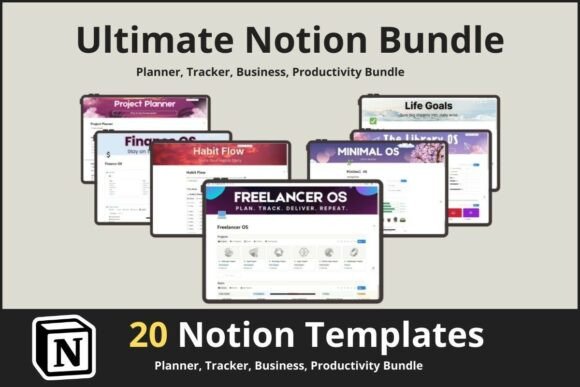
Imagine opening your Notion workspace and finding a complete, ready-to-use system for every part of your life. That’s the core idea behind the 20 Notion Templates Bundle. It’s not just a random collection of pages; it’s a thoughtfully curated ecosystem designed to bring order to the chaos of modern work and life. Each template functions like a specialized tool in a well-organized toolbox, from the Notion Project Planner that maps out your big goals to the Notion Password Manager Pro that secures your digital keys. The visual style across the bundle is clean, modern, and intentionally minimal. This isn't about flashy design; it's about clarity. You’ll find consistent use of toggles, databases with linked views, and subtle icons that create a visual hierarchy without overwhelming you. The personality is that of a calm, capable assistant—professional enough for a client-facing CRM Tracker Notion Template yet personal enough for the Notion Life Tracker Pro.
A Deep Dive into the Bundle's Core Components
The strength of this mega bundle lies in its diversity and depth. Let’s break down a few key templates to understand their practical value. The Notion Task Tracker – Simple To-Do & Pro offers two distinct approaches: a straightforward list for quick captures and a more advanced system with priorities, due dates, and status tracking. This flexibility is crucial. Similarly, the Notion Habit Tracker & Daily Planner and the Habit Tracker Progression Notion Template serve related but distinct purposes. One integrates habits into your daily view, while the other provides a dedicated dashboard for long-term progression analysis. For creators and knowledge workers, the Second Brain Notion Template: Mindloom is a standout. It implements a structured methodology for capturing, organizing, and retrieving information, turning your Notion into a true external brain. Meanwhile, the Notion Finance OS Tracker brings the same level of organization to your personal or business finances, moving beyond simple spreadsheets to a dynamic financial dashboard.
This bundle excels because it’s built on modern typography and information architecture principles. The templates use Notion’s native features—like linked databases, rollups, and relations—to create interconnected systems. The Library OS – Notion Template, for instance, isn’t just a list of books; it’s a database where you can track reading status, notes, and even link quotes to your Second Brain. This relational approach is what transforms a simple collection of pages into a powerful operating system. The Minimal OS – Notion Life Planner embodies this perfectly, offering a sleek, all-in-one dashboard that reduces visual clutter while providing quick access to your calendar, tasks, goals, and notes. It’s a masterclass in digital visual hierarchy.
Who Benefits Most from This System?
While the bundle is universal, certain groups will find it transformative. Entrepreneurs and freelancers will leverage the Notion Template for Freelancer and the Notion Project and Task Tracker Template to manage client work, track invoices, and maintain a professional brand identity across all their project documentation. The CRM Tracker Notion Template becomes the nerve center for client relationships. For students and professionals, the Notion Daily Planner and Notion Sticky Notes Dashboard offer a tactile, digital alternative to paper planners, helping to manage academic deadlines, meeting notes, and ongoing projects with a clear design assets system.
Creators, coaches, and agencies will find immense value in the Notion Life Goals Mastery Template and the Notion Life OS Template. These templates provide frameworks for strategic planning, content calendars, and client management, all crucial for scaling a creative business. The NoteGrid Notion Template can serve as a collaborative hub for team brainstorming and project documentation. Even hobbyists and crafters can use the Notion StickyFlow Board to manage personal projects, plan events, or track collections. The key is that the bundle offers a starting point—a robust, premium font of productivity structure—that is fully customizable. You’re not locked into a rigid system; you’re given a powerful foundation to build upon.
Integrating the Bundle into Your Workflow
Adopting a new system requires a strategy. Don’t try to use all 20 templates at once. Start with your biggest pain point. If project management is your struggle, begin with the Notion Project Planner and the Notion Task Tracker. Spend a week setting it up and inputting your current projects. The plug & play nature means you can have a functional system in under an hour. Next, consider your font pairing—not of typefaces, but of templates. The Notion Daily Planner pairs naturally with the Notion Habit Tracker, creating a seamless daily and weekly review rhythm.
Evaluate the templates like you would a commercial font for a logo design or editorial design project. Does the structure of the Library OS fit how you actually consume information? Does the aesthetic of the Minimal OS align with your personal or brand’s visual tone? The beauty is in the customization. You can change colors, add your own cover images, and restructure databases to match your exact workflow. This isn’t just about using templates; it’s about adopting a system of modern typography for your digital life, where clarity, consistency, and accessibility are the guiding principles. With lifetime access, this bundle becomes a living toolkit you can return to and adapt as your needs evolve, ensuring your digital workspace remains a true reflection of your organized, productive self.